Beta-Tester gesucht: Prüfpläne mit calScript schreiben und den Messplatz mit dem calServer Runner steuern.Bei der Beta mitmachen

MET/TRACK and MET/BASE

From MET/TRACK straight to calServer. No detour through MET/TEAM.

MET/TEAM is being discontinued, so moving there would mean moving into a system that is on its way out. With calServer you take the step only once: your history is taken over, your MET/BASE stays available as a backup you can start at any time, and at the workstations you keep working the way that suits you.

  • Straight from MET/TRACK to calServer, without an intermediate step through MET/TEAM
  • Your MET/BASE stays available as a backup you can start at any time
  • At the workstations, keep using MET/CAL through MET/CONNECT, or calScript
  • Your full history comes along, checkable field by field
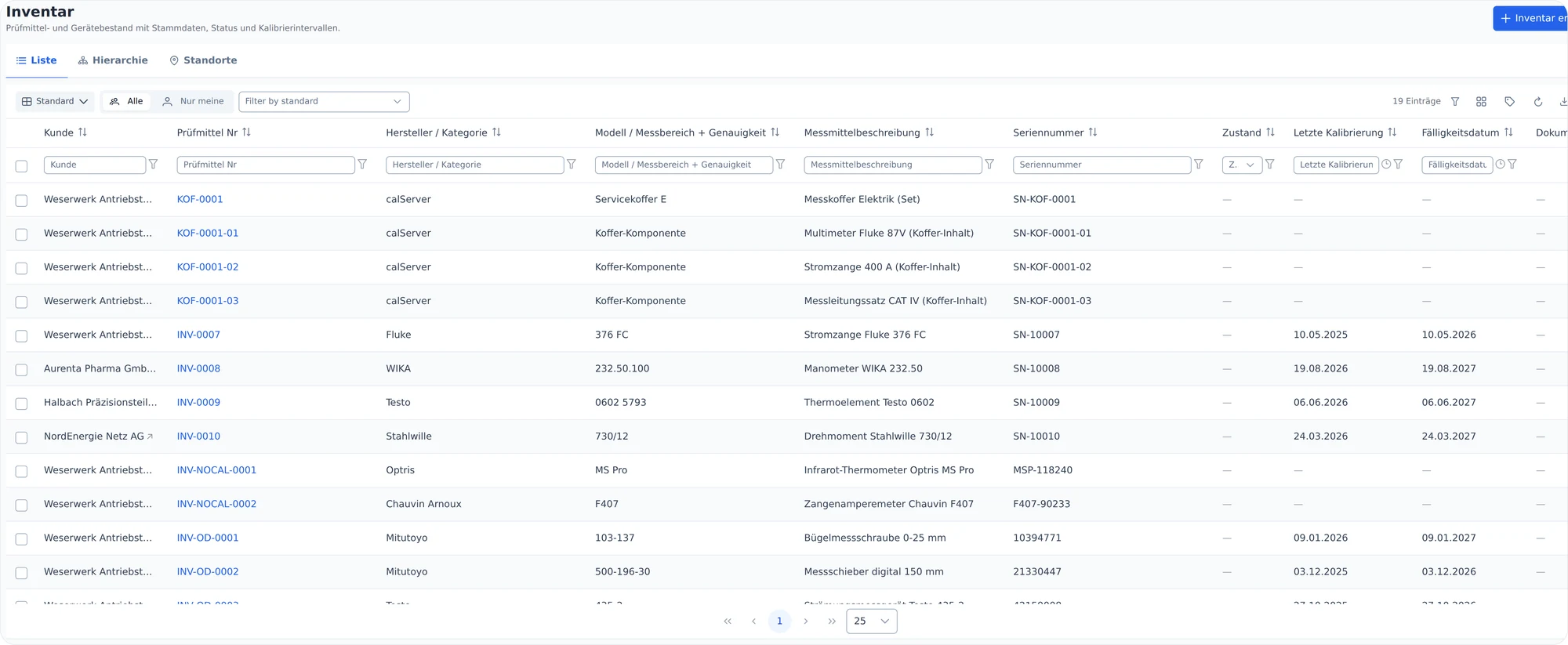
calServer inventory list with customer, equipment number, manufacturer, serial number, last calibration and due date

Why switching often depends on the old data

A MET/BASE often holds ten or twenty years of calibration history: instruments, calibration certificates, readings, repairs and reference standards. This history cannot be entered again, and for audits, DAkkS assessments and ISO/IEC 17025 it has to remain available as evidence.

That is why MET/TRACK keeps running in many places, even when another system has long been wanted. At least one workstation stays in place just to look up old data.

This is exactly where calServer comes in. The history comes along, in a way that lets you check the migration yourself: field by field, with samples against the MET/BASE, before you switch.
One switch instead of two

For a long time, the usual route from MET/TRACK was to move to MET/TEAM. Fluke has announced the end of MET/TEAM on 2026-12-31, and support ends in 2029 at the latest. Anyone who moves to MET/TEAM today faces the next switch in a few years.

With calServer you skip that intermediate step. You switch once, straight from MET/TRACK, and take everything you need with you: the history from the MET/BASE, the MET/BASE itself as a backup, and your usual work at the workstations.

Four steps: upload, check, prepare, take over

We work with a copy of your MET/BASE. Your existing system is not touched.

  1. 1

    Upload

    Step 1

    You upload the MET/BASE file together with its transaction log in the calServer interface. The transfer runs in chunks and resumes where it stopped after an interruption. An existing file is never overwritten.

  2. 2

    Check

    Step 2

    A bundled SQL Anywhere container opens the file. calServer checks which tables are there and shows what can be taken over: instruments, instrument history, calibrations, readings, reference standards, repairs, locations and customers.

  3. 3

    Prepare

    Step 3

    Databases that have grown over the years often need cleanup or adjustment scripts. These run directly in calServer against the copy, with a check beforehand, a result per statement and a complete history.

  4. 4

    Take over

    Step 4

    Master data, calibration history and readings are taken over module by module, with a log. You check samples against the MET/BASE before you switch.

Prepare without touching the original

Scripts run in calServer against the uploaded copy. The system in your building stays as it is.

File or editor

Load or write a script

Load an existing script as a file or write it directly in calServer. Free queries are also useful for checks before the migration.

  • Cleanup and adjustment scripts
  • Check queries before the migration
  • Running scripts is a separate permission

Preview per statement

Check first, then run

calServer splits the script into single statements and warns if a semicolon seems to be missing. By default it runs as a transaction: if a statement fails, everything the database can roll back is rolled back.

  • Warning for a missing semicolon
  • Transaction by default
  • Result per statement

Complete history

Every run is kept

For every run, calServer records who started it and when, which script ran against which file and what each statement did.

  • Who, when, which script
  • Result per statement
  • Running the same script twice only with confirmation

The field codes from MET/TRACK stay recognizable

calServer takes over the fields with their codes from MET/TRACK, for example I4201 for the equipment number. If you know MET/TRACK, you will find your fields again, and every value taken over can be traced back to its source column. That makes the migration checkable.

What differs per installation you set on the migration page before the migration: which field in your MET/BASE holds the status, the instrument type and the calibration certificate number. You can adapt field labels to the terms used in your company.

The history lives in calServer. The MET/BASE stays as a backup.

After the switch, no MET/TRACK workstation has to keep running just to look up old data. Instruments, calibrations and readings are in calServer, with their original field codes. All work happens there.

Your MET/BASE still stays in calServer as a backup. After the migration it rests, but it can be started again at any time, for example when an audit or a DAkkS assessment asks for a detail from before the switch. You do not need your own server or database software for that.

And the workstations? You decide.

Management moves to calServer. How calibration is done at the workstations is up to you, even workstation by workstation.

Familiar procedures, new management

Keep using MET/CAL, with MET/CONNECT

MET/CONNECT is Fluke's current product for MET/CAL, without MET/TEAM on top. calServer syncs with it in both directions: instruments go to the workstations, and results come back automatically.

  • Your MET/CAL procedures stay as they are
  • Results land in calServer without retyping
  • MET/CONNECT license directly from Fluke

Optional, as a beta

Or test plans with calScript

If you want to build new test procedures without MET/CAL, write them in calScript directly in calServer. The calServer Runner controls the instruments at the workstation and sends the readings back.

  • Write and approve test plans in calServer
  • Readings from the instrument, by camera or by hand
  • To try out alongside MET/CAL

At your pace

Or both side by side

Proven procedures keep running with MET/CAL, and new workflows are built in calScript. You switch when it suits you, not because a deadline is pressing.

  • Free choice per workstation
  • No cut-off date
  • Everything ends up in the same history

Questions about switching from MET/TRACK

Do we have to move to MET/TEAM first?
No. You switch straight from MET/TRACK to calServer. An intermediate step through MET/TEAM, which Fluke is discontinuing on 2026-12-31, is not needed.
What happens to our MET/BASE?
The history is taken over into calServer, and afterwards all work happens there. Your MET/BASE stays in calServer as a backup: it rests, but can be started at any time, for example to look something up during an audit.
Do you need access to our running MET/TRACK server?
No. We work with a copy of the MET/BASE file that you upload to calServer. Ideally a cleanly shut down copy including the transaction log.
Our MET/BASE is several gigabytes. Does that work?
Yes. The upload runs in chunks and resumes where it stopped after an interruption instead of starting over.
Does the migration run automatically?
No, and that is intentional. Every MET/BASE has grown differently over the years. calHelp sets up the migration with you and runs test runs, and you check the samples. We give you a schedule after a first look at your database instead of guessing.
And MET/CAL?
MET/CAL stays. Through MET/CONNECT, calServer syncs with your workstations in both directions, and results come back automatically. calServer manages your MET/CAL procedures with versions and approval. If you like, you can also build new workflows with calScript.
Do we need a separate license for MET/CONNECT?
Yes. You license MET/CONNECT directly from Fluke. It is Fluke's current product for MET/CAL without MET/TEAM and continues to be offered.
We already work with MET/TEAM. Does this apply to us too?
For MET/TEAM there is a separate route with ongoing two-way sync. The details are on the page MET/TEAM end of support.
Do we have to go to the cloud?
No. calServer runs on your own server or in a data center in Germany. You decide.

MET/TRACK and MET/BASE

Let's talk about your MET/BASE.

In a call we clarify what data you have, what needs to be prepared and how the migration will work for you.

MET/TRACK, MET/BASE, MET/CAL, MET/CONNECT and MET/TEAM are trademarks of Fluke Corporation and are named here for descriptive purposes only. calServer is an independent product of calHelp and is not affiliated with Fluke. SQL Anywhere is a trademark of SAP SE. The MET/TEAM dates come from Fluke's MET/TEAM status page (retrieved October 2026).