Beta-Tester gesucht: Prüfpläne mit calScript schreiben und den Messplatz mit dem calServer Runner steuern.Bei der Beta mitmachen

Beta

Test plans: define once, test the same way everywhere

A test plan defines what is checked during a calibration, in what order, and which limits apply. In calServer you write it as readable text, maintain recurring parts only once and use the same plan at every workstation.

How a test plan is structured

A plan consists of a few clear parts. Each part has its place, so even large plans stay easy to follow.

Structure

Groups and subgroups

A plan is divided into groups such as "DC voltage" or "Resistance", with, for example, a section for each range below them. Group settings automatically apply to everything below.

  • On the certificate, the structure appears as headings
  • One measuring point is one line

Reuse

Building blocks: maintain once

Parts that appear in many plans, such as the visual inspection of a handheld multimeter, become building blocks. They are maintained once, approved and then included in as many plans as you like.

  • A new version does not quietly change existing plans
  • Only approved building blocks are used

Tolerances

Limits from the data sheet

The permitted deviations are stored with the device type, not in the plan. There can be several variants, such as manufacturer spec, standard or customer requirement. Before calibrating, you choose the right one.

  • Tighter customer limits without copying the plan
  • Unclear limits are not guessed

Flow

Questions and notes for the technician

Where a person has to do or confirm something, the plan says so in the right place. Depending on the answer, the plan can take a different path.

  • Confirmations, questions, manual steps
  • Measure again when a point fails

Defaults

Settings where they belong

How often a point is measured, you set once for the whole lab. Where needed, you override it for a group or a point. The editor shows where each value comes from.

  • Lab-wide standards
  • Targeted exceptions per group or point

Approval

Test before approval

You run a plan in advance with sample values and see whether it evaluates correctly. calServer points out anything unusual, such as a measuring point that can never fail.

  • Trial run with sample values
  • Notes before the first real run

Erst die Spezifikation

Was das Gerät können muss, steht einmal fest

Am Anfang steht die Spezifikation des Gerätetyps: je Messgröße die Werte, Bereiche, Auflösung und die Toleranz, so wie sie im Datenblatt steht. Optionen wie „Hersteller“ oder eine eigene Laborvorgabe liegen nebeneinander.

Geändert wird in einem Entwurf. Erst die Freigabe lässt ihn für neue Kalibrierungen gelten, laufende behalten ihre Revision.

Write it the way the data sheet says

In calServer you write test plans with calScript, a short, readable text. Tolerances look the way you know them from the data sheet, such as "0.3 % + 1 digit". You don't need any programming skills for this.

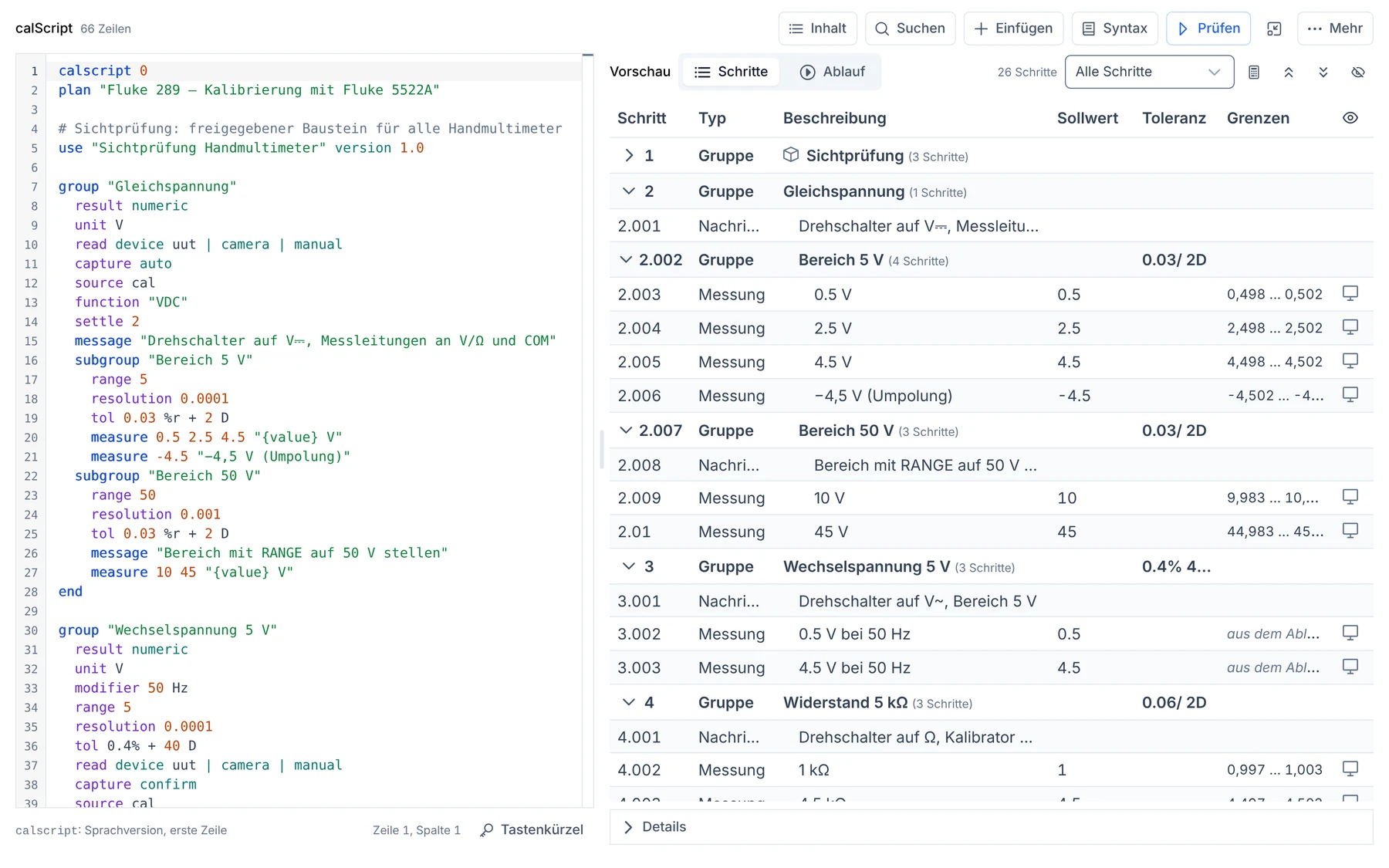
While you write, calServer immediately shows all measuring points with their calculated limits next to it. An error is shown right at its line. If you prefer working in a table, just switch: table and text are two views of the same plan.

Test plan editor in calServer: the plan as text on the left, the measuring points with calculated limits on the right
The plan on the left, the measuring points with their limits on the right, instantly.

You don't have to start from zero

  • Take over from MET/CAL®: Existing procedures and whole projects can be imported. Whatever cannot be transferred reliably is named in the import report. calServer also creates recurring parts as building blocks right away.
  • Sample plans: Several complete plans are included, from the bench multimeter to the pressure gauge.
  • With AI: calScript is ideal for working with AI. Any available AI can be taught it, and you can also connect it internally, for example on your own server. The AI drafts a plan, you read it, adjust it and approve it.

Aus der Spezifikation wird der Prüfplan

Ein Klick statt Abtippen

Steht die Spezifikation, erzeugt calServer daraus den Prüfplan: die Messpunkte mit ihren Grenzen als calScript, bereit zum Lesen und Anpassen. Fehlt die Prozedur dazu, wird sie gleich mit angelegt.

Danach gilt derselbe Weg wie für jeden Plan: prüfen, freigeben, am Messplatz ausführen.

One plan for every workstation

In the past, the test plan often also contained the device commands and the type of reading. If a different device was at the workstation or the interface was missing, you needed a new version. In calServer these are separate:

  • The test plan defines what is tested and which limits apply.
  • The devices are controlled by the calServer Runner at the workstation. How a calibrator is addressed is not in the plan.
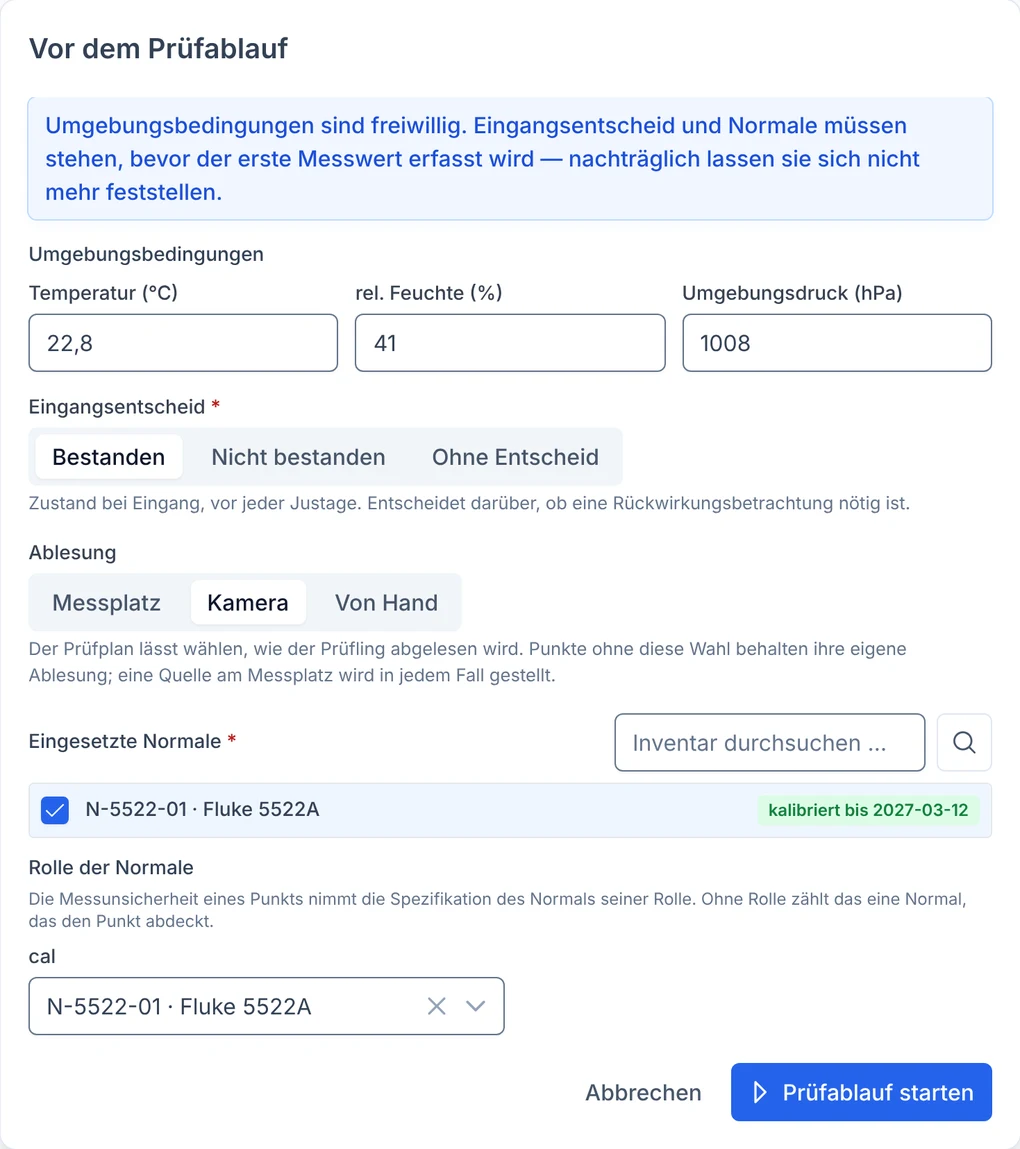
  • The reading is chosen by the technician on site: automatically through the workstation, by camera or by hand. They can also change it during the calibration.
Dialog before the test run: choice of reading via workstation, camera or by hand
Before the start: workstation, camera or by hand. The plan stays the same.

The result: the same plan runs at every workstation. A new device doesn't need a new plan, and a workstation without a device connection doesn't need its own version. Evaluation always happens in calServer, no matter where the value comes from.

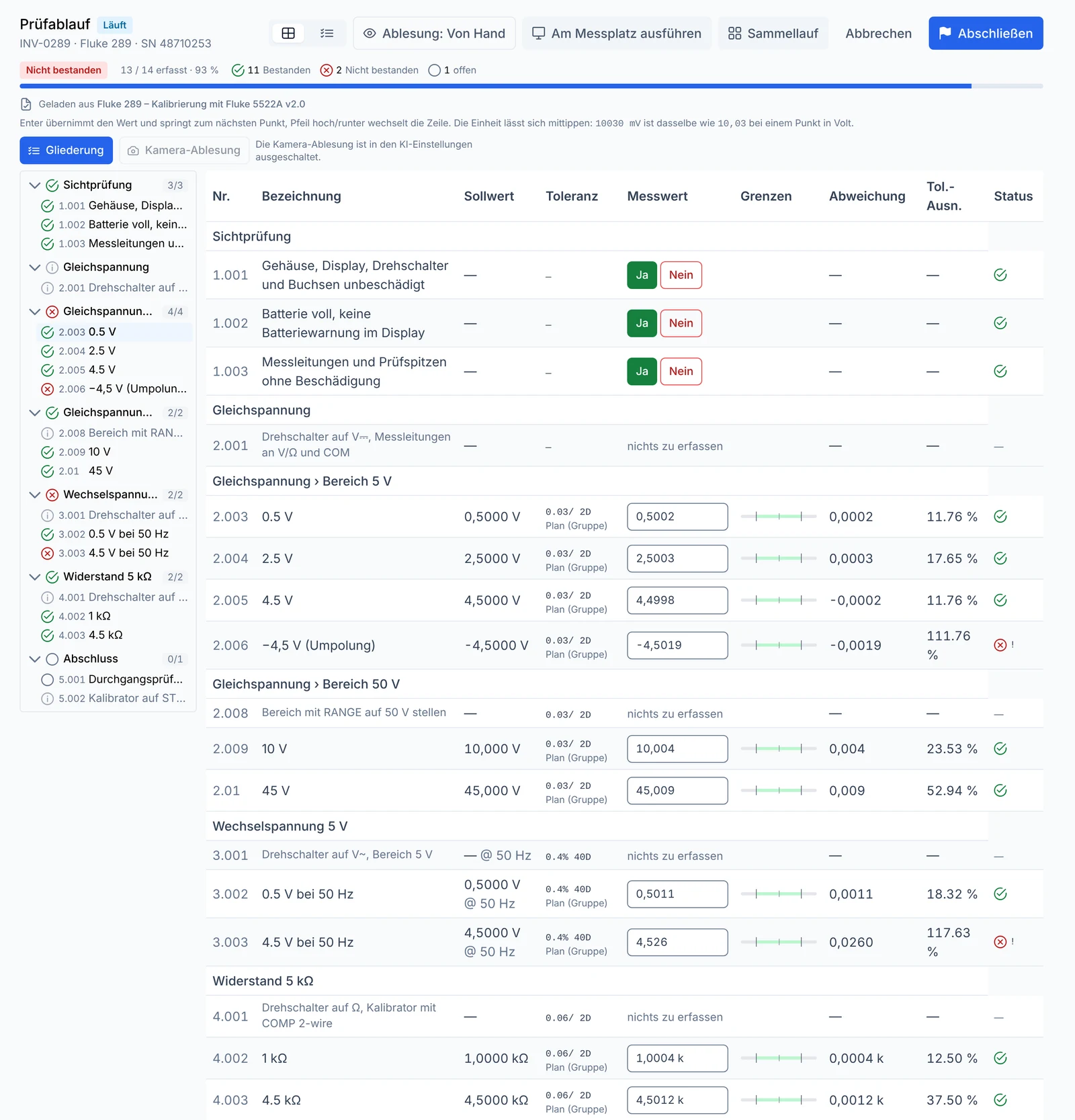
Test run in calServer: structure on the left, each measuring point with measured value, limits and evaluation on the right
In operation: the plan's structure on the left, each point with measured value, limits and evaluation on the right.

Camera reading

Devices without an interface: the camera reads them

For handheld multimeters and any device with a digital display that can't be connected.

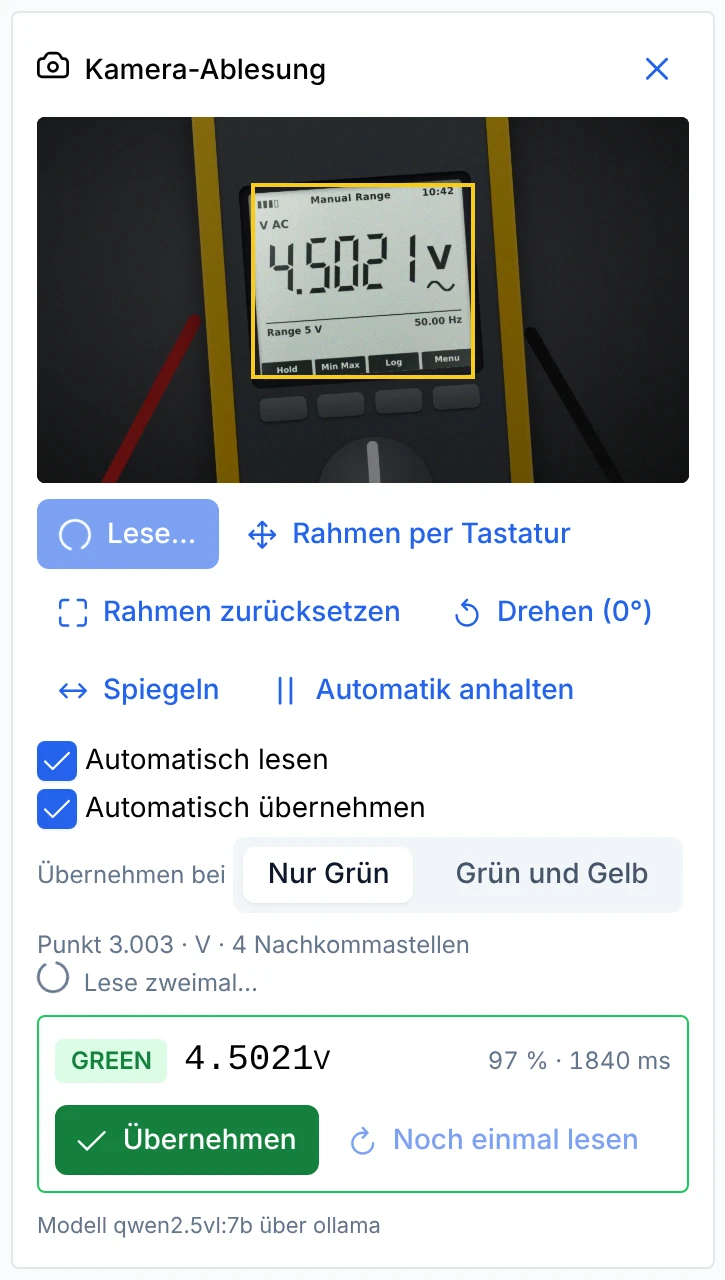
If an instrument has no connection, the webcam reads the display. The technician draws a frame around the display once, and after that calServer recognizes the value shown. The test plan stays the same.

A traffic light shows how reliable the reading is:

  • Green: read cleanly
  • Yellow: uncertain, for example due to reflections
  • Red: never taken over, for example on overflow

If you like, the camera reads automatically as soon as the display is stable, and takes over the value without a click. You decide whether only green counts or yellow as well. For each value, calServer saves an image of the display as evidence. Image recognition can run on your own server. Entering values by hand always works.

Camera reading in calServer: frame around the display of a Fluke 289, read 4.5021 V, traffic light green, read and take over automatically, take over on green only

How it works

From plan to calibration certificate

A test plan accompanies the calibration from the first measuring point to the certificate.

  1. Create the plan

    Write it from scratch, start from a sample or use an existing MET/CAL® procedure as a template.

  2. Test and approve

    Run it with sample values, check the notes, approve the plan.

  3. Calibrate

    Choose the limit variant, choose the reading, start the run.

  4. Evaluate

    calServer evaluates every value as soon as it arrives.

  5. Issue the certificate

    Calibration certificate with structure and a statement of which requirement was used for evaluation.

Frequently asked questions about test plans

Do I need to know how to program?
No. A test plan is a short text with groups, measuring points and tolerances as they appear in the data sheet. calServer shows you immediately what it turns into as you write. If you prefer working in a table, you can switch at any time.
What happens to our MET/CAL® procedures?
They stay as they are: you keep starting MET/CAL® directly from the calibration in calServer. If you would rather maintain individual procedures as a test plan in calServer, you import them. Whatever cannot be transferred reliably is named in the import report.
Do I need a separate plan for every device?
No. The plan contains no device commands. Which device is at the workstation and how it is read are kept separate. The same plan runs at the automated workstation, with a camera or with manual entry.
A customer wants tighter limits. Do I need a copy of the plan?
No. The limits are stored with the device type, and that is where you create a separate variant for the customer. You select it before calibrating. The certificate states which requirement was used for evaluation.
Can an AI write test plans?
Yes. calScript is short and unambiguous, which makes it ideal for working with AI. Any available AI can be taught it: a compact language description with one example is enough. You can also connect the AI internally, for example as a model on your own server. Then no plan leaves your building. calServer checks every draft, and nothing is saved until you have reviewed it.
What does beta mean?
Test plans with calScript are usable and run on real hardware, but the feature set is still growing. Custom formulas and loops in the plan, for example, are not available yet. For the beta we are looking for labs that test along with us and give feedback. We discuss the terms with each lab.
Is calScript a Fluke product?
No. calScript and the calServer Runner were developed independently. MET/CAL® is a trademark of Fluke Corporation.
See your test plan in calServer

Send us one of your test plans, a MET/CAL® project is fine too, or tell us your calibrator. We show you what the plan looks like in calServer.