Test plans as text. Instruments controlled at the workstation.
With calScript you write test plans directly in calServer and let the calServer Runner operate the calibrator and the unit under test at the workstation, meant for workstations where calibration is done by hand today. calScript and the Runner are available now as a beta. Where MET/CAL® is in use, it keeps running unchanged alongside.
calScript is calServer's test plan language. A plan is a short text with groups, measuring points, tolerances and questions. Table and cards in the editor are two views of the same plan, and you can switch at any time.
Editor
Write it like the data sheet
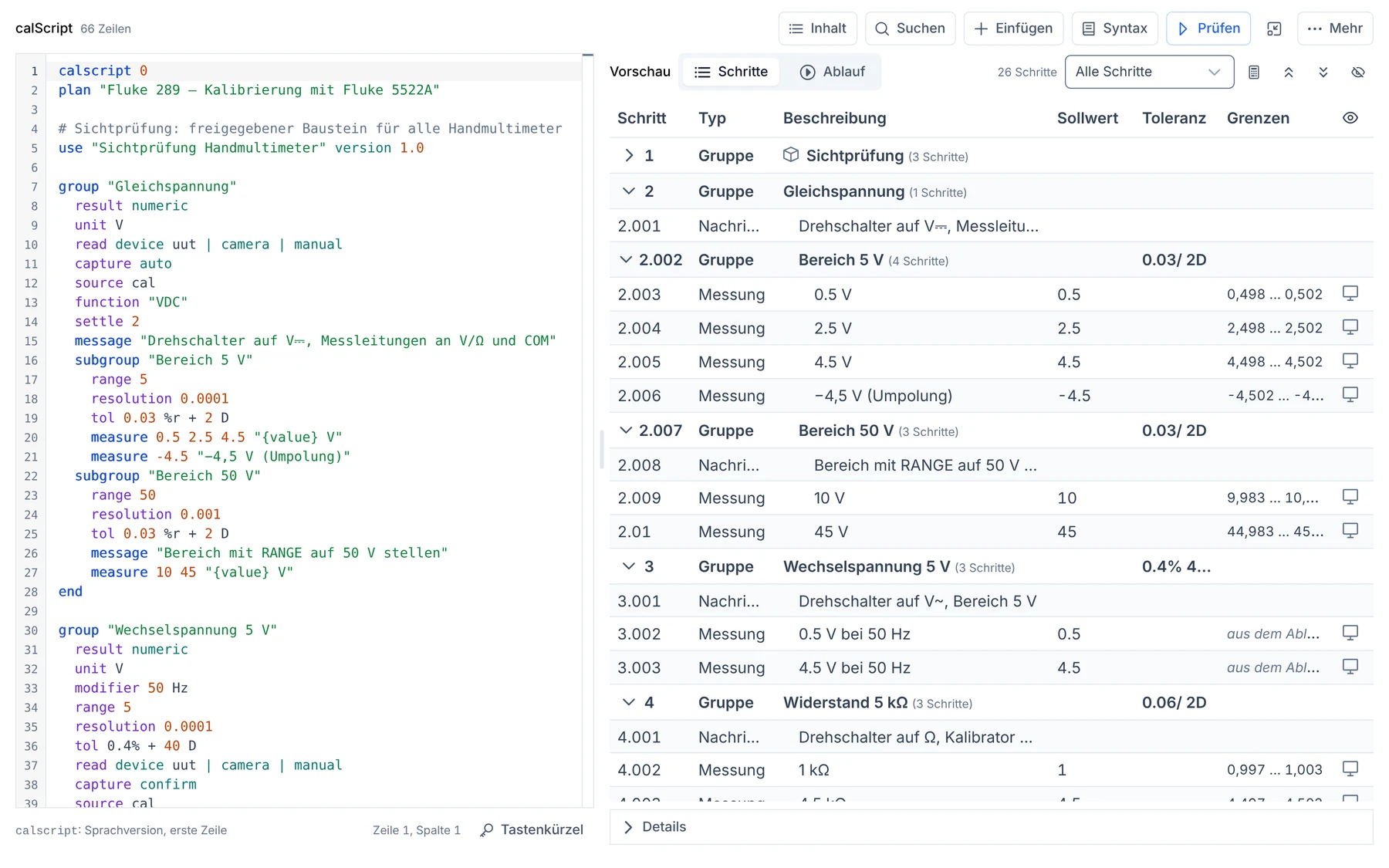
You write tolerances the way they appear in the data sheet, such as "0.3 % + 1 digit". The editor highlights the text, suggests matching statements and immediately shows the measuring points with calculated limits on the right.
Errors are shown at their line, not in a log
Formatting brings every plan into the same shape
Import
MET/CAL® procedures as a starting point
If you would rather continue a plan in calServer, you don't start from zero: existing procedures can be taken over into calScript. Whatever cannot be transferred reliably is named in the import report instead of being quietly guessed. Where MET/CAL® runs, you keep starting it directly from calServer.
Subprocedures and jumps are resolved
Bus commands for the unit under test become a draft driver profile
Flow
Decisions in the plan
Questions for the technician and branches are in the plan itself: a different measuring function depending on the answer, measuring again on fail, repeat measurements per measuring point.
The flow can be walked through as a trial in the editor
A trial reading shows limits and verdict in advance
Metrology
Measurement uncertainty and evaluation
Uncertainty, coverage factor and decision rule for each measuring point, for example per ILAC-G8. Evaluation happens centrally in calServer, just like any other calibration.
The result goes straight into the calibration certificate
No second calculation engine at the workstation
AI
Made for AI
calScript is ideal for development with AI. Any available AI can be taught it; a compact language description with an example is enough. The compiler checks every draft before you read and approve it.
Can be connected internally, for example as a model on your server
Five complete plans are included: from the fully automated bench multimeter and the handheld multimeter with camera to the purely manual pressure gauge.
Each sample explains in its header what it shows
Export a plan and import it into other instances
What a plan looks like
One measuring point is one line. What applies to a whole group is written once above it: unit, range, tolerance, uncertainty. Questions and confirmations sit where the technician needs them at the workstation.
group "DC voltage 320 mV"
  unit V
  prefix m
  range 320
  tol 0.3% + 1 D
  uncertainty 0.03
  k 2
  rule "ILAC-G8 w = U"
  measure 100 "100 mV"
  measure 200 "200 mV"
  measure 300 "300 mV"
end

confirm "Housing and sockets undamaged"
When saved, the text is translated into the same test plan that the step editor also creates. Run, data capture, evaluation and calibration certificate do not change. In the other direction, any existing template can be opened as a script.
The editor: the plan as text on the left, the preview with calculated limits for each measuring point on the right.
Driver, script, input: cleanly separated
Drivers control devices. Which commands a calibrator or multimeter understands is in the calServer Runner's driver profile. The test plan contains no device commands.
The script controls the test flow. calScript defines order, measuring points, tolerances, questions and branches, regardless of which device is at the workstation.
The input is not scripted. Whether a value comes from the Runner, the camera or by hand, the technician chooses during the run. Every path delivers the same measured value into the same evaluation.
That is why the same plan runs at every workstation. A new device needs a driver profile, not a new plan, and a workstation without an interface doesn't need its own version of the plan. In classic procedure languages, device commands, flow and input are all in one script. There, every change at the workstation becomes a change to the procedure.
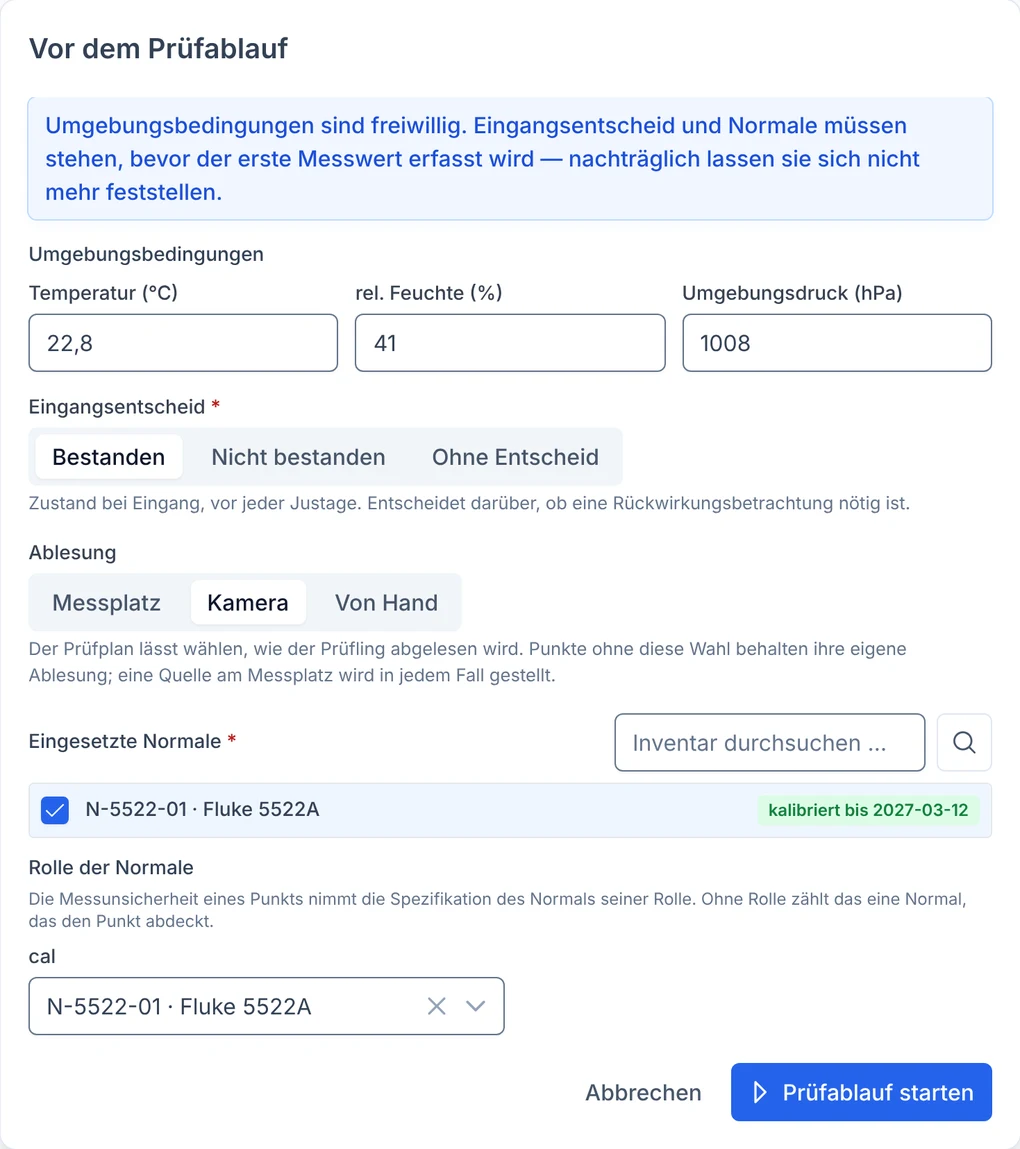
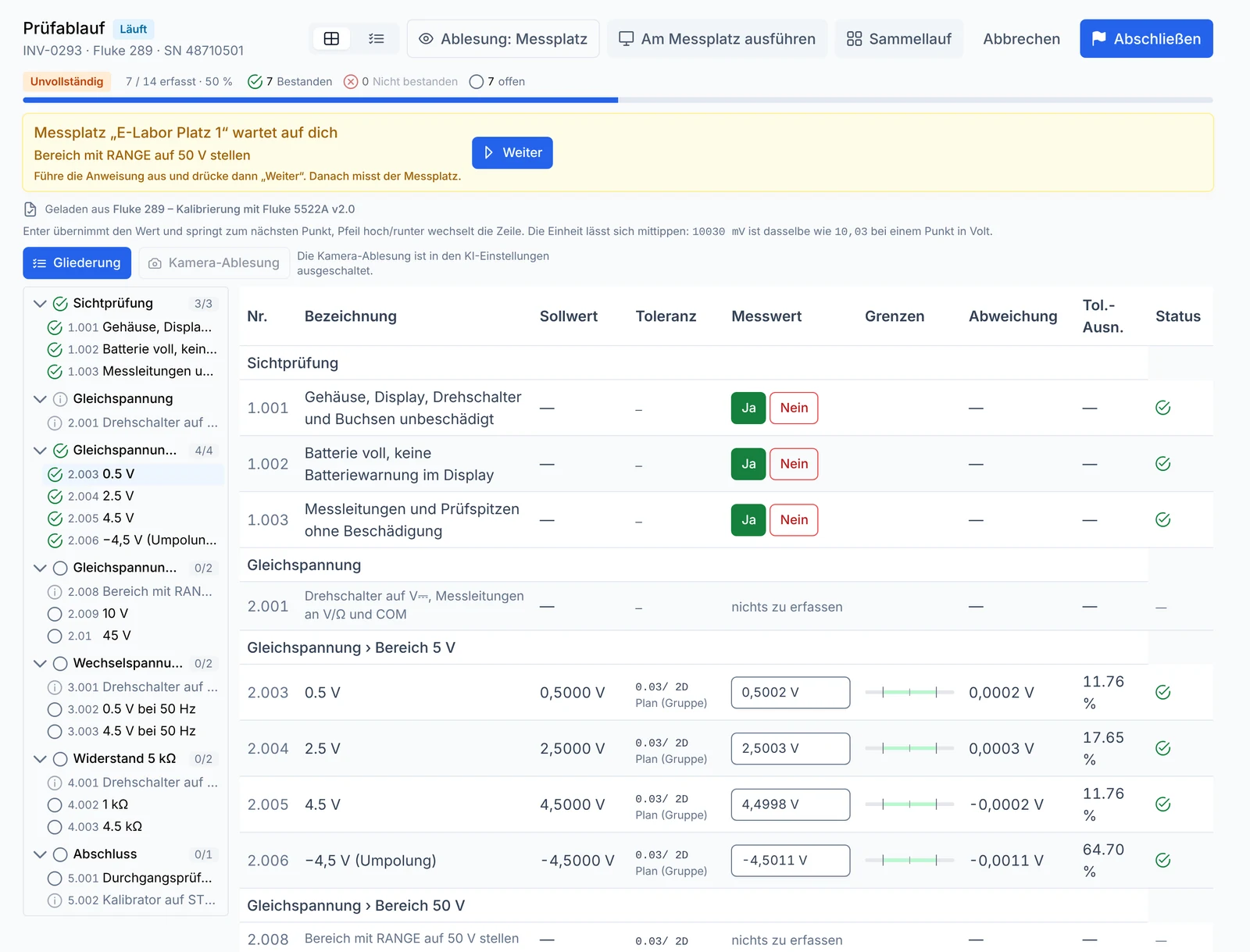
Before the start, the technician chooses how to read: workstation, camera or by hand. The plan stays the same.In operation: the Runner sets the calibrator and measures. Where the plan calls for a manual step, it waits for the technician. Every point is evaluated immediately.
calServer Runner: the runtime at the workstation
calServer runs on the server, the calibrator sits at the workstation. The calServer Runner is the small program in between: it fetches the running test plan, sets up the devices, takes readings and sends every value to calServer right away.
Interfaces
Devices via GPIB, serial, USB and LAN
The Runner supports Fluke 55xx series calibrators and SCPI precision multimeters from Keysight and Keithley out of the box. Further devices are added through driver profiles.
Detect devices on the bus from within calServer
Simulators for dry runs without hardware
One source of truth
calServer evaluates, not the Runner
The Runner only sends the raw value, prefix and unit. calServer calculates tolerance, decision rule and verdict. What the technician sees in the browser is exactly what the Runner wrote.
No second results store at the workstation
Every value records the workstation that captured it
Device knowledge
Driver profiles instead of program code
Which commands a device understands is in a driver profile, not in the program. A profile can be drafted by AI from the manufacturer's programming manual and is checked against a fixed checklist.
Standard profiles visible, your own profiles in calServer
Bus commands from MET/CAL® procedures become a draft profile
Reading
Devices without an interface: camera
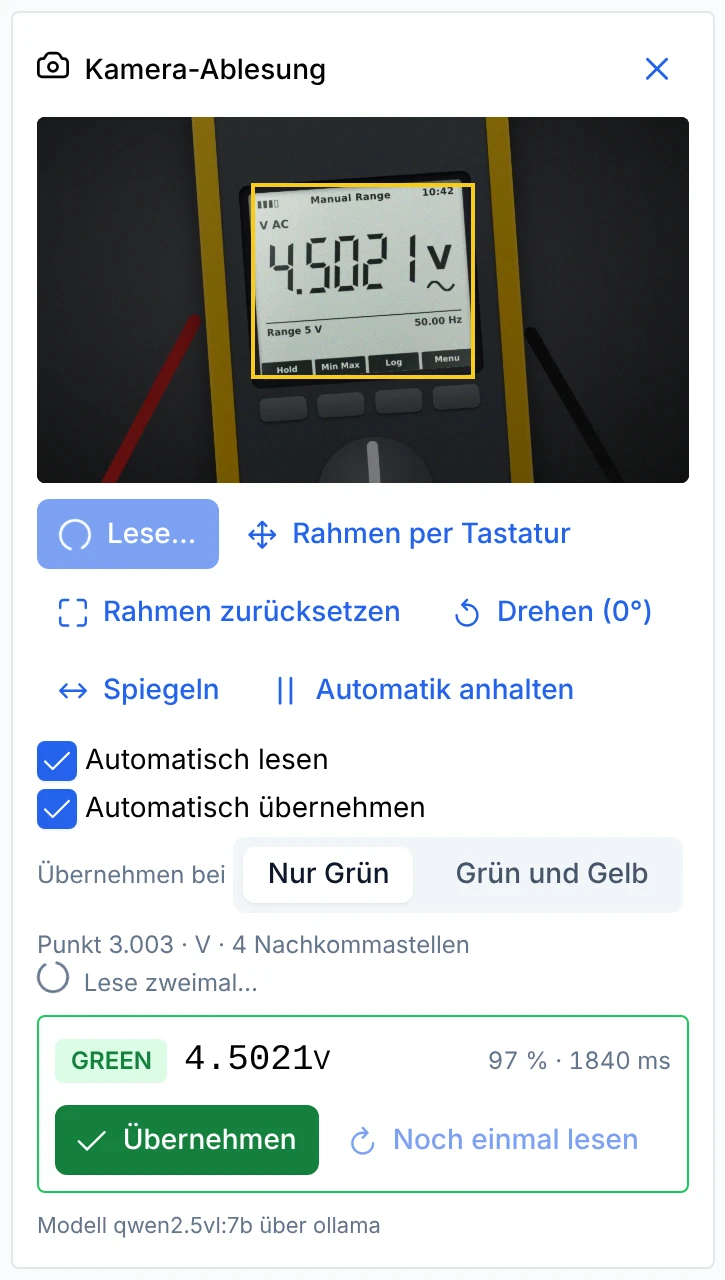
The webcam in the browser reads a handheld multimeter that has no interface. The AI recognizes the display, the technician confirms the value. It reports reflections or overflow instead of guessing.
Only the image area of the display is sent
Entering values by hand is always possible
Robust
Keeps measuring, even without a network
Every value is first stored locally and then sent. If the network goes down, the Runner keeps measuring and sends later. On restart it skips steps that were already captured.
Error log readable for people and AI
Rejected values are not blindly resent
Windows and Linux
Installed in minutes
Download the package from the "Workstations" page in calServer, pair it with the code shown, done. On Windows per user without admin rights, with an icon in the taskbar and start at sign-in.
MSI for central rollout by IT
Separate workstation account with tightly limited permissions
Camera reading
Displays without an interface: the camera reads them
For handheld multimeters, pressure gauges with digital displays and any device that doesn't have a driver profile yet.
The technician draws a frame around the display in the browser once. Only this area goes to the AI model. The model knows the unit and resolution of the measuring point, never the nominal value and never the tolerance. So it can't "see" an expected value.
The traffic light decides what is taken over:
Green: read cleanly, taken over with a click or automatically
Yellow: uncertain, for example due to glare, sign or a differing second reading. The value is entered in the field as a suggestion.
Red: never taken over, for example on overflow or several values in the frame
The options:
Read automatically: The camera reads as soon as the display at the measuring point is stable.
Take over automatically: After two matching readings, the value is taken over without a click. You decide whether only green counts or yellow as well.
Repeat measurements: The camera fills all positions of a measuring point one after another.
Calibrator from the workstation: The calServer Runner sets the reference standard to the nominal value. The camera only reads once the value has settled.
Rotate and mirror: for cameras that show the device sideways or mirrored
For every camera value, calServer saves the source and an evidence image, which is exactly the area the model saw. You choose the AI model yourself: locally on your server or with an external provider such as Anthropic (Claude) or OpenAI (ChatGPT). With an external provider, the panel explicitly says that the image area leaves the building. Camera reading is switched off out of the box. Entering values by hand always works.
How it works
From plan to calibration certificate
calScript describes what is measured. The Runner carries it out at the workstation. calServer evaluates and writes the certificate.
Write or import the plan
New in calScript, as an AI draft or from an existing MET/CAL® procedure. The editor checks every line.
Pair the workstation
Download the Runner, pair it with the code from calServer, let it detect the devices on the bus.
Start the calibration
The Runner fetches the run, sets the calibrator and reads the unit under test. The technician answers questions in the browser.
Evaluate
calServer calculates limits, uncertainty and verdict for every value as soon as it arrives.
Issue the certificate
Approval, calibration certificate and DCC if you like, as with any other calibration in calServer.
Questions about the beta
What does beta mean?
calScript and the calServer Runner are ready to use and run on real hardware. But the language and feature set are still growing every week. We recommend the beta for new plans and as an addition at your workstations, whether alongside MET/CAL® or where calibration has been done by hand so far, with our support, and not yet as the only path for accredited calibrations.
Who can join the beta?
Labs that want to test calScript and the Runner in their daily work and give us feedback. Get in touch: we set up the beta in your calServer instance and pair the first workstation together with you. Your feedback goes straight into development.
How do calScript and MET/CAL® fit together?
Side by side. MET/CAL® stays where it runs and keeps starting directly from the calibration in calServer. You use calScript and the Runner where there is no procedure or where measurements are taken by hand today. You can import individual procedures if you would rather maintain the plan in calServer, but you don't have to. MET/CAL® and MET/TEAM® are trademarks of Fluke Corporation; calScript and the calServer Runner were developed independently of them.
Which devices are supported?
Out of the box, Fluke 55xx series calibrators (5500A, 5520A, 5522A) and SCPI precision multimeters such as Keysight 34401A, 34461A, 34465A, 34470A and Keithley DMM6500. You connect further devices through driver profiles. Devices without an interface are read by the camera, or the technician enters the value.
What does the calServer Runner cost?
The Runner will be a subscription per paired workstation. So you pay for the workstations where it actually runs. We discuss the terms for the beta phase with each participating lab.
Where are the measured values stored?
In calServer, like any other calibration. The Runner only keeps a value locally until calServer has accepted it. There is no second database at the workstation.
Test calScript and the Runner at your workstation
Send us one of your test plans, a MET/CAL® project is fine too, or tell us your calibrator. We show you live how it becomes a calScript plan and how the Runner works through it.